Sandbox environment
The Third-Party Payments API sandbox environment is a testing environment designed so that developers and integrators can simulate transactions and validate their integrations safely, without processing real payments. This environment replicates the behavior of the production environment, allowing you to test payment flows, security validations, API responses, and error handling without affecting end users or generating real charges.
In this documentation you will find everything you need to start working with the sandbox: how to obtain test credentials, request examples, simulatable scenarios, and best practices to ensure a successful integration before going live.
Although the data and behaviors in sandbox mimic the production environment, there may be slight differences. Be sure to perform complete tests before launching your integration to the public.
Sandbox keys
Sandbox keys are obtained in the same way as production keys, with the particularity that when entering the developers page you must switch to normal mode, as shown below:
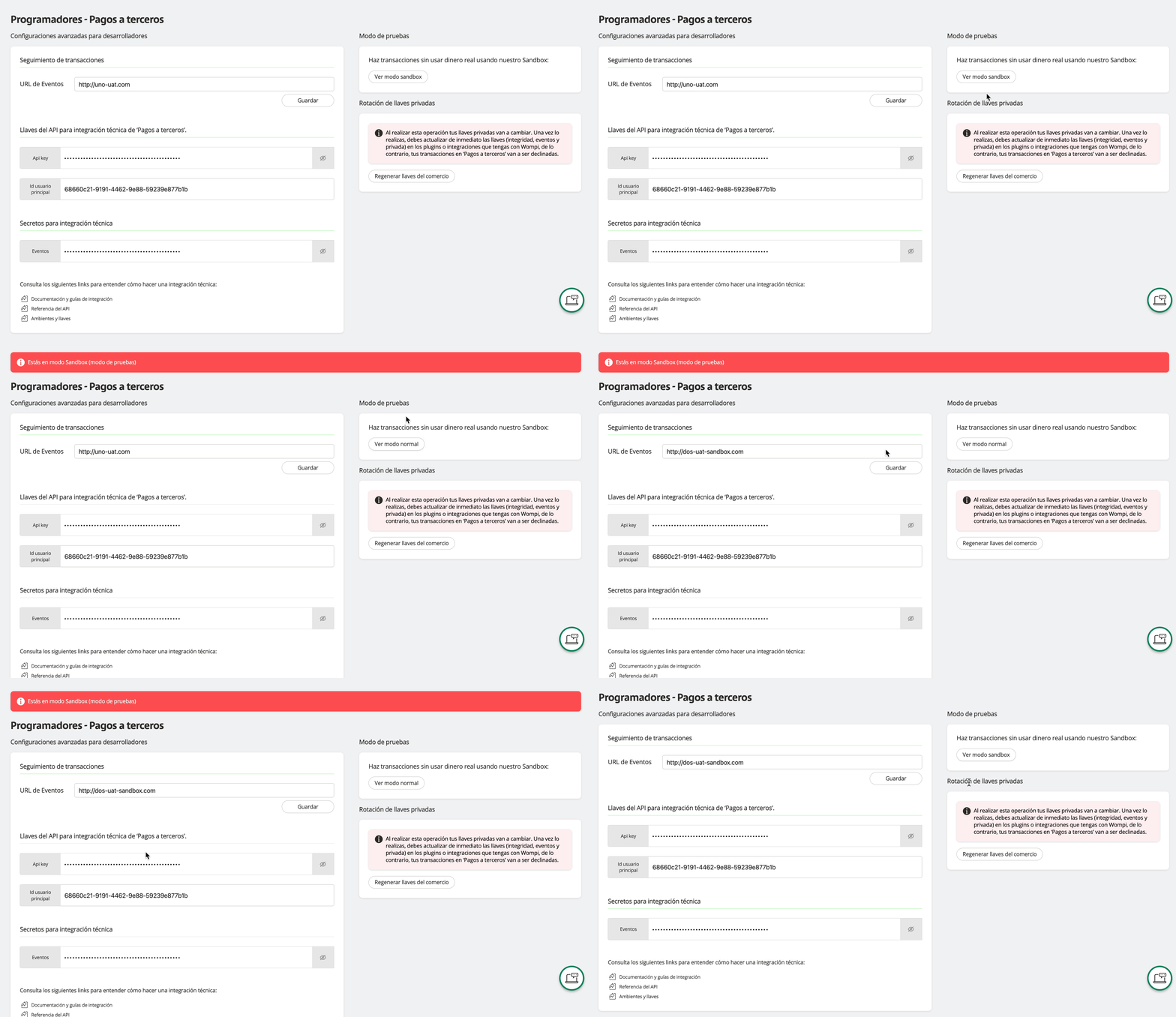
From sandbox mode you can also:
- View keys
- Regenerate keys
- Configure event URL
- View secret for event integration
All production endpoints are available in the sandbox environment
https://api.sandbox.payouts.wompi.co/v1
Remember to use the headers for all requests made to the sandbox API as well. Example:
user-principal-id: {ID_Usuario_Principal}
x-api-key: {API_Key}
Simulate transaction status
In sandbox, the manual payment creation request (in JSON format) or by file are the same, the only difference is that from sandbox you are allowed to define the final status of the transactions, so that they are approved (APPROVED) or failed (FAILED).
This field is optional; if not sent, by default the transactions will be approved (APPROVED).
Manual payment
To simulate the final status of the transactions, you must send the transactionStatus property (see line 5) with the value APPROVED or FAILED.
{
  "reference": "payment-reference",
  "accountId": "account-id",
  "paymentType": "PAYROLL",
  "transactionStatus": "FAILED",
  "transactions": [
    {
      "legalIdType": "CC",
      "legalId": "1000000000",
      "bankId": "00000000-0000-0000-0000-000000000000",
      "accountType": "AHORROS",
      "accountNumber": "00000000",
      "name": "John Doe",
      "email": "email@example.com",
      "amount": 1000000,
      "reference": "custom-transaction-reference"
    }
  ]
}
Payment by file
You must add the transactionStatus property to the form-data.
Top up an account balance
The Wompi sandbox environment includes an exclusive endpoint to top up the balance of test accounts, allowing you to simulate operations that require available funds.
This functionality is only available in sandbox and does not affect real accounts.
The endpoint URL to top up an account is:
POST /accounts/balance-recharge
You must send in the request body the fields accountId (id of the account to top up) and amount (amount to top up in cents). It must be at least $1,000.00 and at most $50,000,000.00
The accountId is obtained by querying the accounts. See Query accounts and balances
{
  "accountId": "account-id",
  "amountInCents": 340000000
}
