Use our Third-Party Payments API
1. How the API works
Our payments API solves this problem by offering a robust tool, optimized to process real-time payments and adapted to multiple business scenarios, so our clients can make their payment dispersions from their own platforms or applications.
Wompi's Third-Party Payments API facilitates the dispersion of payments to bank accounts in Colombia through the creation and management of payment batches. Users can send payments individually or in batches, using compatible files or JSON requests.
- We have a Sandbox environment so clients can simulate payments, check responses, simulate balance top-ups for origin accounts, and validate payment reports in a test environment.
- The API allows the use of multiple origin accounts: Wompi account, Bancolombia accounts, and accounts from other authorized banks.
- Idempotency support has been incorporated to avoid duplicate payments.
- Event notification via webhook.
- Additionally, we offer a Dashboard where clients can:
- Check transaction traceability in production.
- View the API events debugger.
- Download reports of processed payments.
2. Types of payments available through the API
Our payment dispersion API offers flexibility to adapt to different business needs. Through the integration, you can make the following types of payments:
Immediate payments: Allows you to execute a payment order at the moment it is requested. Ideal for operations that require real-time processing, such as payments to suppliers or disbursements to end users.
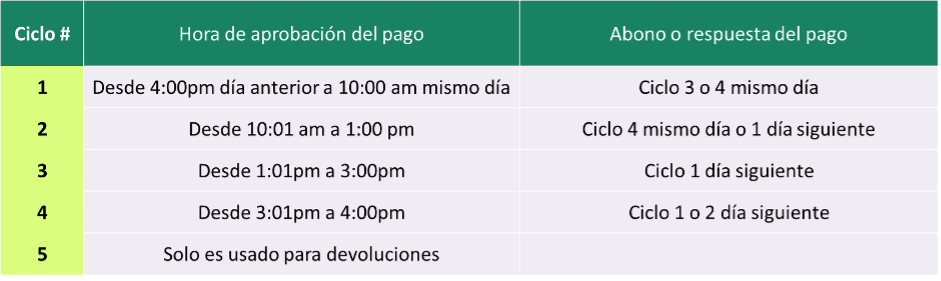
Keep in mind the ACH processing cycles and the origin account of the dispersion
Scheduled payments: Allows you to schedule payments to be processed on a specific future date. This functionality is useful for planning payroll payments, recurring obligations, or payments to third parties on agreed dates.
Recurring payments: Allows you to set up payments that are executed periodically (for example, weekly, biweekly, or monthly). This option is ideal for automating recurring payments such as memberships or periodic services.
Each type of payment can be easily managed through the payment order creation endpoints, defining the necessary parameters such as the scheduling type, the desired execution date, and the details of the recipients.
Important: Scheduled and recurring payments will be registered in the system and executed according to the configuration established at the time of creation. See later how to configure each type of payment.
3. General integration flow
3.1. Authentication
Obtain the authentication keys (API Key and Principal User ID) from the Wompi dashboard.
3.2. Batch Creation
- One-to-one payment: Send a
POSTrequest to the/payoutsendpoint with the transaction details in JSON format. See Create your first batch - Payment by file: Send a
POSTrequest to the/payouts/fileendpoint attaching a file in one of the supported formats (WOMPI,SAP,PAB,DISFON,BANCO_OCCIDENTE_FC,DAVIVIENDA). See Create a batch by file
3.3. Validation of the data sent:
Wompi validates the provided data and sends it for processing.
3.4. Processing of payment batches and start of the payment process
Wompi processes the transactions sent in the batches and carries out the payment process, using the same bank or ACH according to the selected account.
3.5. Queries and events for transaction status changes
Check the status of batches and transactions using the provided endpoints to get detailed information or updates for each payment sent via webhook.
3.6. Reports:
Consolidated reports by batches and transactions available through the API or the Wompi dashboard.
4. General considerations
- Currency: All transactions are made in Colombian pesos (COP).
- Amounts: Amounts are handled in cents and as integers, where the last two digits correspond to the cents. E.g.
100000is equivalent to$1,000.00 - Authentication Keys: It is essential to obtain the authentication keys (API Key and Principal User ID) from the Wompi dashboard to interact with the API. See Authentication Keys
- Supported file formats: When creating batches via files, the API can support and translate the following formats: Wompi Template, PAB and SAP Bancolombia, DISFON Banco de Bogotá, Banco de Occidente FC, Davivienda.
- Limits and restrictions: There is a daily transactional limit of $1,500,000,000. This limit can be increased or decreased if the client requires it. There are restrictions on the number of daily batches that can be sent per client, which is 3,800 daily batches. However, each batch has no restrictions on the number of transactions it can contain. If you need to adjust the limits, contact support.
- Idempotency: Implemented to avoid duplicate payments using a unique key generated by the client that expires in 24 hours.
- Sandbox: Environment available to simulate test scenarios equivalent to the production environment.
- Processing hours: Payments are processed during the hours established by Wompi and the banking entities. It is recommended to check these hours to ensure timely processing of transactions.
5. Required data for a payment
When creating a payment batch, the following data must be provided for each transaction:
- legalIdType (String): Beneficiary's identification type (CC, NIT, CE).
- legalId (String): Beneficiary's identification number.
- bankId (UUID): Unique bank identifier, obtained from the
/banksendpoint. - accountType (String): Bank account type (
AHORROS,CORRIENTE). - accountNumber (String): Bank account number. Must contain only numbers and be different from zero.
- name (String): Beneficiary's full name.
- email (String): Beneficiary's email address.
- amount (Integer): Amount to transfer in cents (for example, $10,000 COP is represented as 1000000).
- reference (String): Unique reference for the transaction.
- accountId (String): Origin account identifier, obtained from the
/accountsendpoint. - paymentType (String): Payment type (
PAYROLL,PROVIDERS,OTHER).
6. Types of bank accounts
The types of bank accounts supported by the API are:
- AHORROS: Savings account.
- CORRIENTE: Checking account.
7. Bank Codes in Colombia
To get the updated list of banks and their unique identifiers (bankId), you must query the /banks endpoint provided by Wompi.
| Bank | Code |
|---|---|
| BANCO DE BOGOTA | 1001 |
| BANCO POPULAR | 1002 |
| ITAU before Corpbanca | 1006 |
| BANCOLOMBIA | 1007 |
| CITIBANK | 1009 |
| BANCO GNB SUDAMERIS | 1012 |
| BBVA COLOMBIA | 1013 |
| ITAU | 1014 |
| SCOTIABANK COLPATRIA S.A | 1019 |
| BANCO DE OCCIDENTE | 1023 |
| BANCOLDEX S.A. | 1031 |
| BANCO CAJA SOCIAL BCSC SA | 1032 |
| BANCO AGRARIO | 1040 |
| BANCO MUNDO MUJER | 1047 |
| BANCO DAVIVIENDA SA | 1051 |
| BANCO AV VILLAS | 1052 |
| BANCO W S.A | 1053 |
| BANCAMIA S.A | 1059 |
| BANCO PICHINCHA | 1060 |
| BANCOOMEVA | 1061 |
| BANCO FALABELLA S.A. | 1062 |
| BANCO FINANDINA S.A. | 1063 |
| BANCO SANTANDER DE NEGOCIOS CO | 1065 |
| BANCO COOPERATIVO COOPCENTRAL | 1066 |
| MIBANCO S.A. | 1067 |
| BANCO SERFINANZA S.A | 1069 |
| LULO BANK S.A. | 1070 |
| BANCO J.P. MORGAN COLOMBIA S.A | 1071 |
| FINANCIERA JURISCOOP S.A. COMP | 1121 |
| COOPERATIVA FINANCIERA DE ANTI | 1283 |
| JFK COOPERATIVA FINANCIERA | 1286 |
| COOTRAFA COOPERATIVA FINANCIER | 1289 |
| CONFIAR COOPERATIVA FINANCIERA | 1292 |
| BANCO UNION S.A | 1303 |
| COLTEFINANCIERA S.A | 1370 |
| NEQUI | 1507 |
| DAVIPLATA | 1551 |
| BANCO CREDIFINANCIERA SA. | 1558 |
| PIBANK | 1560 |
| IRIS | 1637 |
| MOVII | 1801 |
| DING TECNIPAGOS SA | 1802 |
| POWWI | 1803 |
| Ualá | 1804 |
| BANCO BTG PACTUAL | 1805 |
| BOLD CF | 1808 |
| NU | 1809 |
| RAPPIPAY | 1811 |
| COINK | 1812 |
| GLOBAL66 | 1814 |
| BANCO CONTACTAR S.A. | 1819 |
8. Bank validations
The account number must be numeric and between 6 and 20 characters.
- The bank code must be valid and on the list of supported banks.
- Payments to blocked or inactive accounts will be rejected.
- The beneficiary must match the account holder in some banks.
- Balance and daily limit validations before processing the payment.
9. Batch and Transaction Statuses
Batch statuses
| Batch status | Is it a final status? | Description | |
|---|---|---|---|
| PENDING_APPROVAL | To approve | No | Initial status of the batch, which will be reviewed and approved/rejected by the approver role. Applies to payments created only from the Wompi dashboard. |
| PENDING | In process | No | Payment batch approved by the approver role, which is in the process of execution. |
| NOT_APPROVED | Not approved | No | Payment batch that has been rejected by the approver role. |
| REJECTED | Rejected | Yes | Payment batch rejected due to policy non-compliance, banking errors, file errors, or account restrictions. |
| PARTIAL_PAYMENT | Partial pay | No | Occurs when a payment batch contains transactions in different statuses, some already finalized and others still in process. |
| TOTAL_PAYMENT | Processed | Yes | All transactions in the batch have been managed and have a final status, either approved or rejected. |
Transaction statuses:
| Transaction status | Is it a final status? | Description | |
|---|---|---|---|
| PENDING | In process | No | The transaction is in progress or pending to be applied to the beneficiary's account. |
| APPROVED | Paid | Yes | The transaction was successfully applied to the beneficiary's account. |
| CANCELLED | Cancelled | Yes | The transaction was not processed and must be reloaded. Generated when the approver rejects the payment. |
| FAILED | Rejected | Yes | The transaction was not credited to the beneficiary due to incorrect information or restrictions on the destination account. |
10. Most common rejection reasons
| Code | Description | Status |
|---|---|---|
| D02 | Bank does not exist | FAILED |
| D04 | Invalid transaction type | FAILED |
| D06 | Payment office not numeric | FAILED |
| D07 | Account number does not exist | FAILED |
| D09 | Reference code not numeric | FAILED |
| D10 | Account not authorized for credit | FAILED |
| D11 | Account and Nit do not match | FAILED |
| D12 | Provider Nit not registered for payments | FAILED |
| D14 | Wrong value in non-monetary transaction | FAILED |
| D15 | Check or cash payment not allowed | FAILED |
| D18 | Nit not numeric | FAILED |
| D19 | Insufficient funds | FAILED |
| D21 | Beneficiary name missing | FAILED |
| D24 | Value 0 in destination | FAILED |
| D25 | Nit in zeros | FAILED |
| D29 | Payer Nit not registered for card services | FAILED |
| D30 | Invalid transaction for payment type | FAILED |
| D31 | Cancelled pension account status | FAILED |
| D32 | Bank code not numeric | FAILED |
| D33 | Bank code in zeros | FAILED |
| D34 | Account number not numeric | FAILED |
| D35 | Invalid application date | FAILED |
| D37 | Invalid office | FAILED |
| D39 | Invalid identification type | FAILED |
| D40 | Office not authorized for transaction | FAILED |
| D41 | Payment without authorized ID | FAILED |
| D44 | Pensioner not registered for the entity | FAILED |
| D45 | Pension account not registered for paying entity | FAILED |
| D49 | Bank code not allowed | FAILED |
