3DSecure Transactions
Introduction
In this guide, you will learn how to perform a transaction using the 3D Secure protocol. 3D Secure is an authentication system that adds an additional layer of security to online transactions. Through this protocol, card issuers and acquirers can authenticate the cardholder before processing the transaction.
Workflow
The process of a 3D Secure transaction generally follows these steps:
-
Transaction initiation: The customer selects products or services and proceeds to payment on your platform.
-
Redirect to authentication page: After entering the card details, the customer will be automatically redirected to the card issuer's authentication page.
-
Cardholder authentication: The card issuer will request the cardholder to enter a password or a unique verification code. This can be a password, an OTP (One-Time Password), or a fingerprint, depending on the implemented authentication method.
-
Transaction authorization: Once the cardholder has been successfully authenticated, the card issuer will generate a successful authentication message and send it to the acquirer.
-
Transaction processing: The acquirer receives the successful authentication message and proceeds to authorize the transaction. It verifies if there are sufficient funds in the cardholder's account and if the transaction complies with card limits and fraud rules.
-
Transaction confirmation: Once the transaction has been processed and successfully authorized, a confirmation will be displayed to the customer indicating that the transaction has been completed.
Implementing 3D Secure on Your Platform
Prerequisites
Before starting implementation, make sure you have the following:
- Authentication keys: In this section we will only use the public key, which we will send as a
Bearer tokenin the requestheaders. - Test data.
- Execution environment URLs (Sandbox).
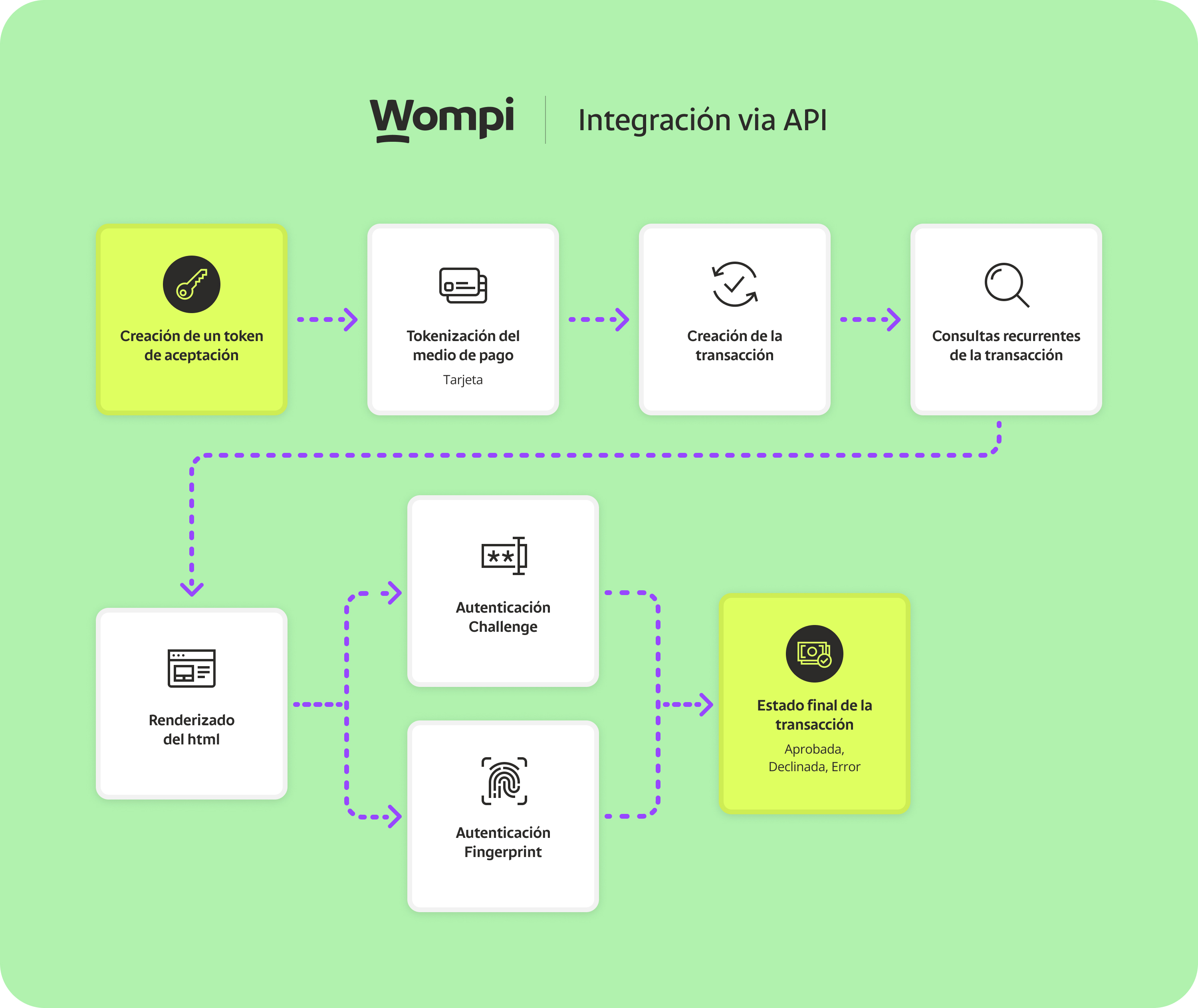
Step 1. Obtain a pre-signed acceptance token.
Step 2. Tokenize the payment method (Card).
Step 3. Create the transaction:
To create a transaction, make a POST /transactions request with the following JSON body:
{
  "acceptance_token": "acceptance_token", // Generated in step 1
  "amount_in_cents": 100,
  "currency": "USD",
  "customer_email": "pepito_perez@example.com",
  "reference": "AHJDFDSFK184", // Unique value to identify the transaction
  "payment_method": {
    "type": "CARD",
    "token": "token" // Generated in step 2
  }
}
Note: To use external authentication servers, Wompi receives authorization data in the three_ds_auth_external_provider field as shown below:
{
  "acceptance_token": "acceptance_token", // Generated in step 1
  "amount_in_cents": 100,
  "currency": "USD",
  "customer_email": "pepito_perez@example.com",
  "reference": "AHJDFDSFK184", // Unique value to identify the transaction
  "payment_method": {
    "type": "CARD",
    "token": "token", // Generated in step 2
    "extra_three_ds_aut_external_provider": {
      "message_version": "{{VERSION}}",
      "trans_status": "{{VALID_VALUE_STATUS}}",
      "authentication_value": "{{AUTH_VALUE}}",
      "three_ds_server_trans_id": "{{SERVER_DIRECTORY_ID}}"
    }
  }
}
Important: To use third-party authorization servers, prior authorization must be requested.
You will receive the following JSON response:
{
  "data": {
    "id": "1196-1688604884-42949",
    "created_at": "2023-07-06T00:54:50.207Z",
    "finalized_at": null,
    "amount_in_cents": 100,
    "reference": "AHJDFDSFK184",
    "customer_email": "pepito_perez@example.com",
    "currency": "USD",
    "payment_method_type": "CARD",
    "payment_method": {
      "type": "CARD",
      "extra": {
        "bin": "497011",
        "name": "VISA-1029",
        "brand": "VISA",
        "exp_year": "29",
        "exp_month": "06",
        "last_four": "1029",
        "card_holder": "Pedro Pérez",
        "is_three_ds": false
      },
      "installments": 1
    },
    "status": "PENDING",
    "status_message": null,
    "billing_data": null,
    "shipping_address": null,
    "redirect_url": null,
    "payment_source_id": null,
    "payment_link_id": null,
    "customer_data": null,
    "bill_id": null,
    "taxes": []
  }
}
Step 4. Perform periodic transaction queries to verify status and ensure correct execution.
These queries should be performed repeatedly since during integration it may be necessary to render the CHALLENGE IFRAME, which is detailed in the following steps.
Below are examples of how to implement long polling logic on your platform:
Cargando ejemplos...
After receiving the three_ds_auth object in the transaction response, it is mandatory to display the following
Mastercard logo on your platform to inform payers that their transaction is being authenticated through 3D Secure,
per Mastercard policies. Below we show the flow as we do it at Wompi for your reference:
First you'll need the following Mastercard logo for the next steps. To download the logo, click the following image or open it in a new tab:

Mastercard 3D Secure Logo Implementation Flow
- We create the transaction and perform periodic queries (long polling) to check the transaction status.
- When we receive the
three_ds_authobject in the transaction response, we display the Mastercard 3D Secure logo on our platform to inform the payer that their transaction is being authenticated through 3D Secure.
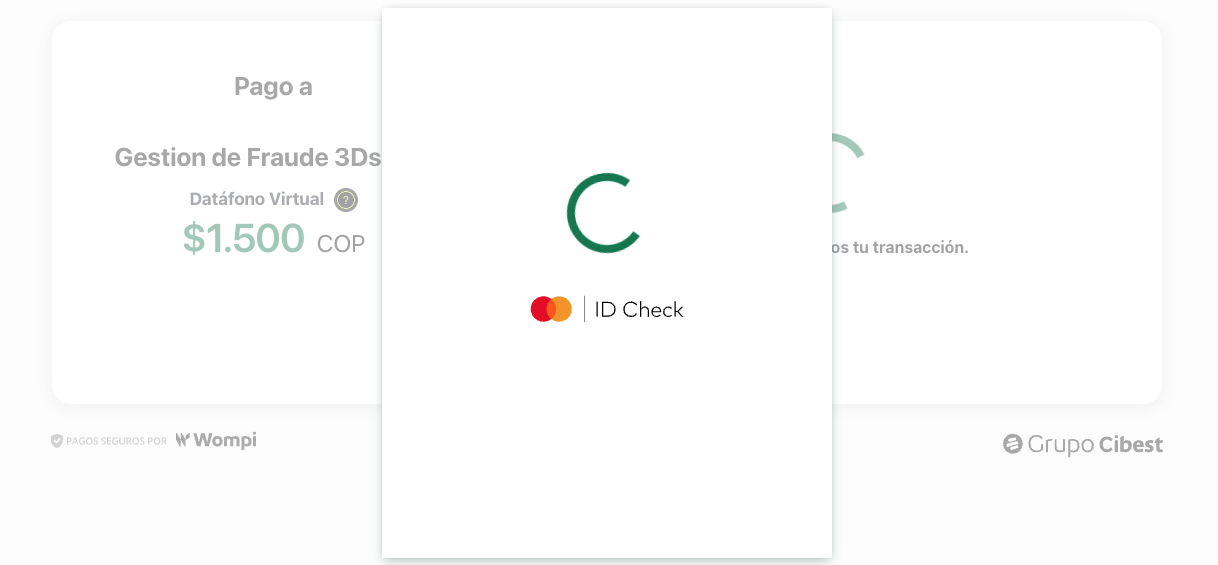
Displaying this logo is mandatory per Mastercard policies, so make sure to implement it correctly on your platform. It does not have to be a modal like the example, but it must be visible to the payer.
-
Depending on the authentication scenario, we will proceed to render the challenge
IFRAME(CHALLENGE). -
If the challenge has been completed or the new authentication status is AUTHENTICATION, we display the Mastercard 3D Secure logo again to inform the payer that their transaction has been authenticated through 3D Secure.
- We wait for the final transaction status to show the result to the payer.
- We finish the process by displaying the transaction result to the payer.
Step 5. Render the IFRAME to continue the authentication process:
We will observe that in the transaction, the payment_method key contains relevant additional information. Specifically, we will focus on the three_ds_method_data key, which includes an HTML code snippet. This is an IFRAME block that must be integrated and displayed on the page to securely carry out the card authentication process. This field contains escaped HTML (with HTML entities like < instead of <), so you need to decode it before rendering it. Additionally, we will also find the current_step key, which indicates the current authentication state and may refer to the specific type of authentication required to verify the cardholder's identity.
What does "decoding" the content mean?
The content comes in escaped format (with HTML entities) for secure transmission. These are the most common entities you'll find:
<→<>→>"→"&→&
You don't need to replace each entity manually. The code examples shown below decode all the content at once, automatically converting all HTML entities to their corresponding characters.
For example:
// RECEIVED content (escaped):
"<iframe src='https://example.com'></iframe>"

// DECODED content (ready to use):
"<iframe src='https://example.com'></iframe>"
Code examples for decoding the iframe HTML
Below, we show different ways to decode the escaped HTML content:
Cargando ejemplos...
The DOMParser method is the most recommended as it's safer and supported in all modern browsers.
- DO NOT use the
srcattribute of the iframe, you must usesrcDocwith the decoded HTML - Make sure the iframe has enough space (we recommend at least 400-500px height)
- The iframe must be visible and not hidden with CSS
Below is how these elements appear in the transaction response:
{
  "data": {
    "id": "1196-1688604884-42949",
    "created_at": "2023-07-06T00:54:50.207Z",
    "amount_in_cents": 100,
    "reference": "JSAGDF7329",
    "currency": "USD",
    "payment_method_type": "CARD",
    "payment_method": {
      "type": "CARD",
      "extra": {
        "name": "VISA-0031",
        "brand": "VISA",
        "last_four": "0031",
        "three_ds_auth": {
          "current_step": "BROWSER_INFO", // Refers to the authentication type: (BROWSER_INFO - CHALLENGE)
          "current_step_status": "PENDING",
          "three_ds_method_data": "<iframe>...</iframe><form>...</form>" // HTML to be rendered for card authentication
        }
      },
      "installments": 1
    },
    "redirect_url": null,
    "status": "PENDING",
    "status_message": null,
    "merchant": {
      "name": "Tests SandBox",
      "legal_name": "Tests SandBox",
      "contact_name": "Pepito Perez",
      "phone_number": "+50732345634",
      "logo_url": null,
      "legal_id_type": "RUC",
      "email": "pepito@test.com",
      "legal_id": "2452345-5"
    },
    "taxes": []
  }
}
Step 6. Don't forget to perform periodic transaction queries until it reaches a final status.
This is how an approved transaction looks:
{
  "data": {
    "id": "1196-1687956860-36807",
    "created_at": "2023-06-28T12:54:23.740Z",
    "amount_in_cents": 100,
    "reference": "devtest_VPOS_jTYzjz_1687956812524_6y6kix6d52b",
    "currency": "USD",
    "payment_method_type": "CARD",
    "payment_method": {
      "type": "CARD",
      "extra": {
        "name": "VISA-0031",
        "brand": "VISA",
        "last_four": "0031",
        "is_three_ds": true,
        "three_ds_auth": {
          "three_ds_auth": {
            "current_step": "AUTHENTICATION",
            "current_step_status": "COMPLETED"
          }
        },
        "external_identifier": "aaydSncOcB",
        "processor_response_code": "00"
      },
      "installments": 1
    },
    "redirect_url": null,
    "status": "APPROVED",
    "status_message": null,
    "merchant": {
      "name": "Tests SandBox",
      "legal_name": "Tests SandBox",
      "contact_name": "Pepito Perez",
      "phone_number": "+50732345634",
      "logo_url": null,
      "legal_id_type": "RUC",
      "email": "prueba@test.com",
      "legal_id": "2452345-5"
    },
    "taxes": []
  }
}
Complete React Implementation
For projects using React, we provide a modular and complete implementation that handles the entire 3DS flow:
Cargando ejemplos...
React component features:
- Automatic Long Polling: Queries transaction status every 2-3 seconds using Wompi's endpoint
- Shows Mastercard Logo: Complies with mandatory policy requirements by displaying it when
three_ds_authis received - Handles CHALLENGE: Renders the iframe when
current_stepisCHALLENGEandcurrent_step_statusisPENDING - Automatic Decoding: Correctly converts escaped HTML using DOMParser
- Clear Visual States: Loading, Challenge visible, and final states (APPROVED, DECLINED, ERROR)
- Resource Cleanup: Automatic interval and listener cleanup in useEffect
- TypeScript Ready: Complete types for better development
The component automatically handles:
- Periodic queries (long polling) until final status is obtained
- Decoding of iframe HTML when necessary
- Display of Mastercard logo according to required policies
- Rendering of challenge iframe when
current_stepisCHALLENGE
You only need to replace YOUR_PUBLIC_KEY with your Wompi public key in the fetchTransactionStatus function.
