Payment Sources & Tokenization
Important change on the Public API
When creating transactions and payment sources, and because we keep our users privacy in the top of our priorities, the usage of acceptance tokens is now mandatory when creating either of these resources through our API.
With Wompi you can charge your customers more than once by using by using payment sources. For example, you can build subscription services for a magazine, charge for an on-demand service like a delivery or whichever payment experience your users need to pay more than once, but giving you the credit card details only once.
The payment sources feature can be used with **Cards, which requires the customer to only input the Card, so that it can be used to charge them afterwards without requiring their presence or manual intervention again.
You only need to follow the step by step instructions which are detailed next:
Guide for intermediate - advanced users
The steps outlined next require an integration and direct usage of our API, which is why they are oriented to intermediate and advanced developers who are familiarized with the usage of APIs.
Step by step
- Step 1 — Ask users for the payment method information.
- Step 2 — Create a payment source.
- Step 3 — Create a transaction using the payment source.
Step 1: Ask for the payment method information
The first of these 3 steps to charge using a payment source, requires the secure storage of a credit card. For that, you will use our API in a way to save information in a safe and secure way.
The process of saving and representing card information in a secure way is called: tokenization. This means that you should send the payment method information to the Wompi API only once, to obtain a token which you will use to create a payment source as outlined in Step 2 of this guide.
Take into account the API environment
Remember that in Wompi there is a Sandbox environment for test transactions and a Production environment for real payments. For more details read our guide on environments and sources clicking here.
Cards
For cards (credit and debit with CVV), follow the steps in Tokenize a card to obtain the token you need to create a payment source.
Clave
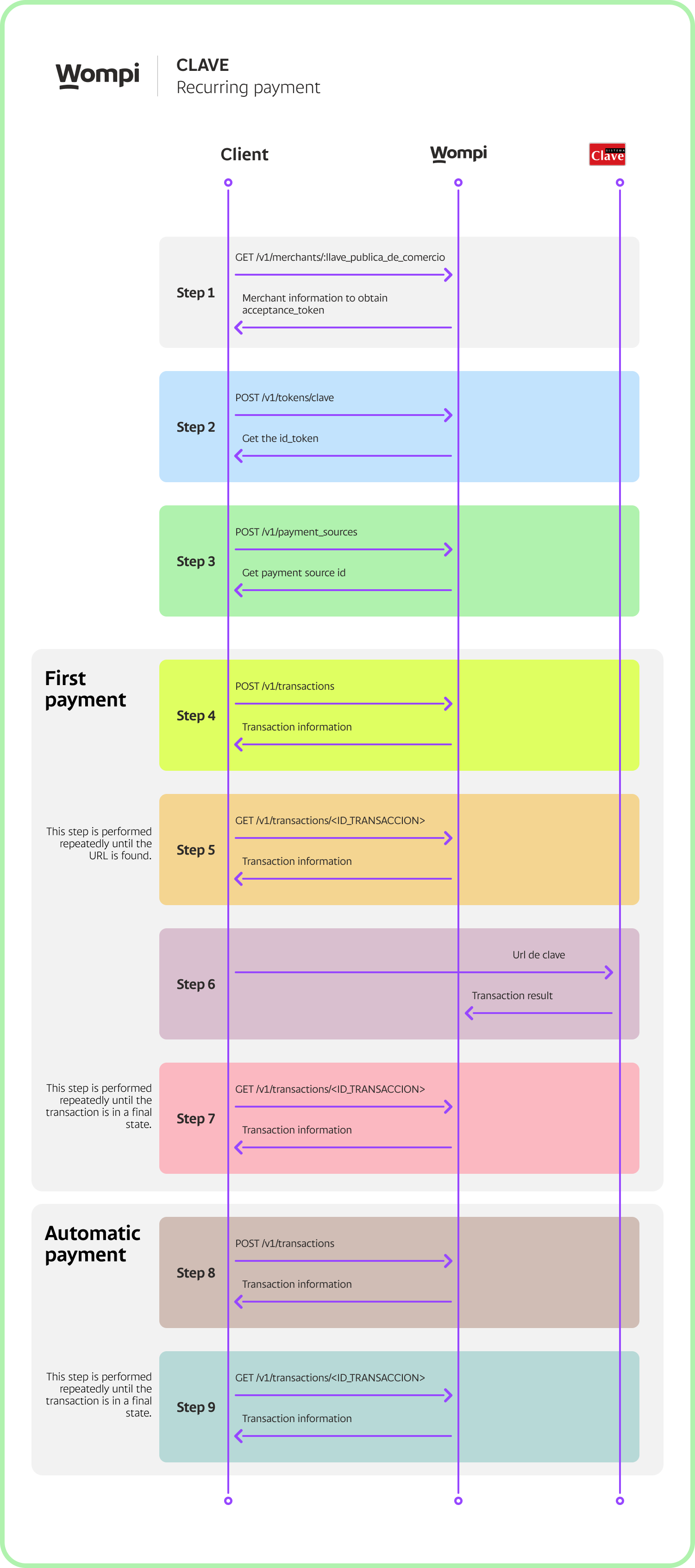
For Clave payments, you should use the endpoint /v1/tokens/clave to make a POST request with the Public Key as the authorizer, using the following JSON body:
{
  "commerce_client_id": 12345, // id of the client in the merchant's system
  "commerce_operation": "RECURRING_CHARGE"
}
You will receive a response with the token in the id_token property, which you can use to register the payment source.
{
  "data": {
    "id_token": "clave_prod_EOoscJEkrGJkLz6CAmDWt2f6EJn5PJaR",
    "status": "APPROVED",
    "commerce_client_id": "12345",
    "commerce_operation": "RECURRING_CHARGE"
  },
  "meta": {}
}
Step 2: Create a payment source
To create a payment source, you'll use the following endpoint:
POST /v1/payment_sources
With the following required fields:
"customer_email"is the user's email address."type"indicates the kind of payment method that corresponds to the token, which can be"CARD"or"CLAVE"."token"Clave or Card token obtained above."acceptance_token"an acceptance-token.
Cards
The following is the request body you'll need to send when creating Payment Sources for a Card, using "CARD" as its type and the card token obtained from Step 1:
{
  "type": "CARD",
  "token": "tok_prod_1_BBb749EAB32e97a2D058Dd538a608301",
  "customer_email": "john_smith@example.com",
  "acceptance_token": "eyJhbGciOiJIUzI1NiJ9.eyJjb250cmFjdF9pZCI6MSwicGVybWFsaW5rIjoiaHR0cHM6Ly93b21waS5jby93cC1jb250ZW50L3VwbG9hZHMvMjAxOS8wOS9URVJNSU5PUy1ZLUNPTkRJQ0lPTkVTLURFLVVTTy1VU1VBUklPUy1XT01QSS5wZGYiLCJmaWxlX2hhc2giOiIzZGNkMGM5OGU3NGFhYjk3OTdjZmY3ODExNzMxZjc3YiIsImppdCI6IjE1ODEwOTIzNjItMzk1NDkiLCJleHAiOjE1ODEwOTU5NjJ9.JwGfnfXsP9fbyOiQXFtQ_7T4r-tjvQrkFx0NyfIED5s"
}
You should now obtain a JSON response similar to the following, indicating the payment source was created and is available to use:
{
  "data": {
    "id": 333,
    "public_data": {
      "bin": "424242",
      "last_four": "4242",
      "exp_month": "06",
      "exp_year": "29",
      "card_holder": "Pedro Pérez",
      "validity_ends_at": "2026-01-14T14:28:48.749+00:00",
      "type": "CARD"
    },
    "token": "tok_devtest_196_4963b22704de91b358746294cf4a738f",
    "type": "CARD",
    "status": "AVAILABLE",
    "customer_email": "test@test.com"
  }
}
Clave
The request body should be similar to the following:
{
  "type": "CLAVE",
  "token": "clave_prod_EOoscJEkrGJkLz6CAmDWt2f6EJn5PJaR",
  "customer_email": "pepito_perez@example.com",
  "acceptance_token": "eyJhbGciOiJIUzI1NiJ9.eyJjb250cmFjdF9pZCI6MSwicGVybWFsaW5rIjoiaHR0cHM6Ly93b21waS5jby93cC1jb250ZW50L3VwbG9hZHMvMjAxOS8wOS9URVJNSU5PUy1ZLUNPTkRJQ0lPTkVTLURFLVVTTy1VU1VBUklPUy1XT01QSS5wZGYiLCJmaWxlX2hhc2giOiIzZGNkMGM5OGU3NGFhYjk3OTdjZmY3ODExNzMxZjc3YiIsImppdCI6IjE1ODEwOTIzNjItMzk1NDkiLCJleHAiOjE1ODEwOTU5NjJ9.JwGfnfXsP9fbyOiQXFtQ_7T4r-tjvQrkFx0NyfIED5s"
}
You will receive a response with a structure like the following, indicating that it was successfully created:
{
  "data": {
    "id": 123,
    "public_data": {
      "type": "CLAVE",
      "commerce_client_id": "12345",
      "commerce_operation": "RECURRING_CHARGE"
    },
    "token": "clave_devtest_EOoscJEkrGJkLz6CAmDWt2f6EJn5PJaR",
    "type": "CLAVE",
    "status": "AVAILABLE",
    "customer_email": "pepito_perez@example.com"
  },
  "meta": {}
}
Step 3: Create a transaction
Use your private key to create transactions using payment sources
Keep in mind that, in order to create transactions using a payment source, the transactions creation endpoint requires the use of the private key and must be done from your back-end (server) to keep that key protected.You should never do it from the user's device (browser, mobile device, etc).
An id of a payment source, when available, can be used to charge your customers without their direct intervention for each one of them. This way, you can, for example, charge for a periodical or on-demand service.
For this, you need to use the same transaction endpoint that simple payments use (POST to
/v1/transactions), but this time you will send the information of the payment method directly (object payment_method) with the number of installments, if the payment method represented by the payment source is a card. In either case, you will need to add the payment_source_id you just created, for example:
{
  "amount_in_cents": 4499, // Amount in cents
  "currency": "USD", // Currency
  "signature": "37c8407747e595535433ef8f6a811d853cd943046624a0ec04662b17bbf33bf5", //Integrity signature
  "customer_email": "example@gmail.com", // User email
  "payment_method": {
    "installments": 2 // Number of installment if the payment source represents a card otherwise ignore the payment_method field altogether.
  },
  "reference": "sJK4489dDjkd390ds02", // Unique payment reference
  "payment_source_id": 3891 // Payment source ID
}
NOTE: If you have doubts about how to generate the integrity signature value, you can review the following documentation: ** Generate an integrity signature**.
Cards
Initial Authentication Process:
To enable recurring payments, the customer must complete all transaction steps using ** 3D Secure** with the payment method "CARD" and the previously created "payment_source." It is important to note that in this scenario, there is no need to tokenize the card again; instead, utilize the payment source generated in the preceding step.
{
  "acceptance_token": "acceptance_token", // Generated in the first step
  "amount_in_cents": 100,
  "currency": "USD",
  "customer_email": "pepito_perez@example.com",
  "reference": "AHJDFDSFK184", // Unique value to identify the transaction
  "payment_method": {
    "type": "CARD"
  },
  "payment_source_id": 3891 // payment source id
}
Following this, continue with the rest of the 3D Secure flow. If the transaction is approved, subsequent payments will not require additional customer interaction.
Clave
Initial Authentication:
To enable recurring payments, the customer must complete all the steps of a simple payment using the Clave payment method and the previously created payment_source. During this process, the customer will follow all the authentication steps required by Clave to authorize the charge. This initial transaction ensures that the customer agrees to the future use of recurring payments.
Widget in tokenization mode
You can integrate our Widget in tokenization mode so that you can save your users' information more quickly and safely.
With just a few lines of HTML:
<form method="POST" action="/process_token">
  <script
    src="https://checkout.wompi.pa/widget.js"
    data-render="button"
    data-widget-operation="tokenize"
    data-public-key="pub_test_X0zDA9xoKdePzhd8a0x9HAez7HgGO2fH"
  ></script>
</form>
With the token inside the response, you must do a POST to /v1/payment_sources from your server and using your private commerce key. Remember never to use the private key in insecure contexts like your HTML code.
